Billing and help
Plans and billing
The Shoppy Find in Store plans, the free trial, charges for extra stores and Geo IP lookups, and how to change your plan.
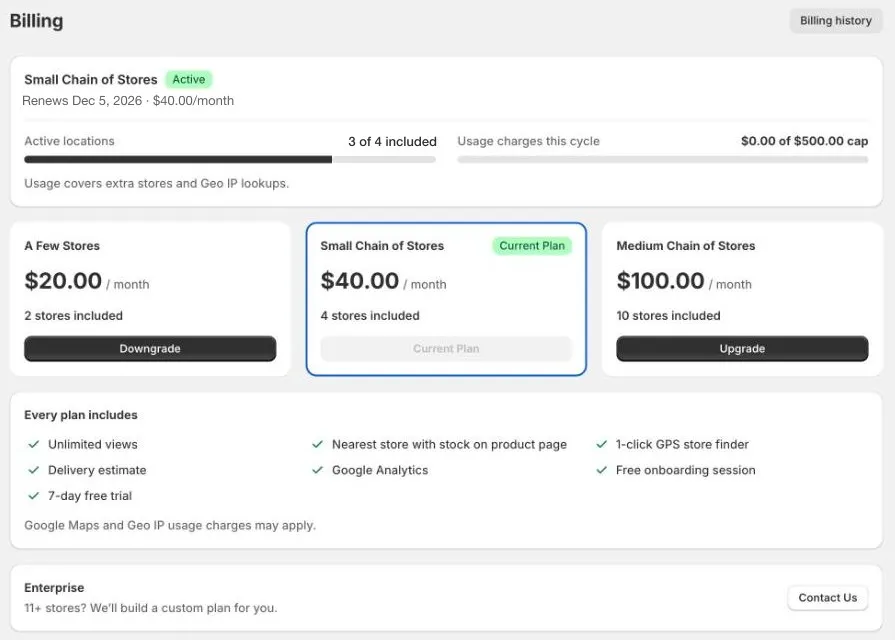
Find in Store is billed through Shopify, so charges appear on your Shopify bill. Go to Billing in the app menu to see your plan and change it.
Free trial
Every new store gets a 7-day free trial.
- You can use every feature, with as many locations as you like.
- Nothing is charged during the trial, including extra stores and Geo IP lookups.
- If you choose a plan during the trial, your remaining trial days carry over.
When the trial ends, choose a plan to keep using the app. Until you do, the app opens on Billing, and the widget stops showing stores on your online store.
The trial only happens once. If you uninstall and install the app again, it doesn’t restart.
Plans
Prices are in US dollars, per month.
| Plan | Price | Stores included | Each extra store |
|---|---|---|---|
| A Few Stores | $20 | 2 | $12.50 |
| Small Chain of Stores | $40 | 4 | $15 |
| Medium Chain of Stores | $100 | 10 | $20 |
| Enterprise | Custom | 11 or more | Custom |
Every plan includes unlimited views, the nearest store with stock on your product pages, the Use my location store finder, delivery estimates, and a free setup session.
For 11 or more stores, click Contact Us under Enterprise, and we’ll build a plan for you.
What you’re charged for
Your plan
Your plan’s monthly price, every 30 days.
Extra stores
Only Active locations count. If you have more active locations than your plan includes, each extra one is charged at your plan’s Each extra store price, once a month.
For example, on Small Chain of Stores with 6 active locations, you pay $40 for the plan, plus 2 × $15 = $30 for the extra stores.
To avoid extra charges, set locations customers don’t need to see to Inactive. See Find, filter, and bulk edit locations.
Geo IP lookups
If you turn on Auto-detect location (Geo IP), each plan includes 100,000 lookups every 30 days. After that, it’s $11 for each extra 100,000 lookups. See Geo IP and usage charges.
Usage cap
Extra stores and Geo IP lookups are usage charges. They’re capped at $500 in each billing cycle, so you’re never charged more than that for usage. Usage charges this cycle on Billing shows how much you’ve used so far.
Google may also charge you for using Google Maps, through your own Google Cloud account. See Get a Google Maps API key.
Change your plan
- Go to Billing in the app menu.
- Click Upgrade or Downgrade on the plan you want.
- Check the new price, then click Approve.
- Shopify asks you to approve the charge. Click Approve again.
If you move to a plan with fewer included stores, your extra active locations are charged as extra stores.
Billing history
Click Billing history at the top of Billing to see your current and past plans.
Stop paying for the app
To stop all charges, uninstall the app. Shopify cancels your plan straight away. See Uninstall Shoppy Find in Store.